Audio Editor & MP3 Editor
- 4.1
- Rating
- 1.00M
- Installs
- Free
- Price
 Analysis by App-foxy
I approached Audio Editor & MP3 Editor as the kind of tool I would keep on my phone for quick audio jobs rather than as a replacement for a full desktop studio. It sits in the Music & Audio category, is free to install, and comes from CamSoft AI Magic. After spending time with its editing workflow, my impression is that its appeal is straightforward: it aims to make everyday audio trimming, extraction, and conversion tasks feel less intimidating than they often do in a traditional editor.
That focus matters because many people do not need a complicated timeline, a library of studio effects, or a large production environment. They may simply want to cut a section from a recording, prepare a shorter clip, separate audio from a video, or make a file easier to share. The app is built around that practical territory. I would recommend it most readily to someone who values convenience and wants to work directly from an Android phone without learning a professional audio program first.
Its current store presence is substantial, with more than a million installs and an average score of 4.1 from roughly thirty-three thousand ratings. Those figures suggest that the app has found a broad audience, although they should not be mistaken for proof that every workflow is equally polished. My own view is more specific: it is useful when the task is clearly defined, but you should approach it as a mobile utility with limits rather than an all-purpose recording suite.
You May Also Like

 Blood Strike: 2.5 Anniversary
Blood Strike’s Loadouts Turn Every Drop Into a Tactical Gamble
A close look at Blood Strike’s custom loadouts: how fast access to signature weapons reshapes its battle royale rhythm, rewards preparation, and narrows the gap between fights.

 Pandora - Music & Podcasts
Pandora’s Music Is Easy to Start, but Harder to Recover
Pandora’s strength is its low-effort path from a seed to a station. Its weak spot is how much confidence it asks you to place in connection, setup, and quiet recovery.

 8 Ball Pool
 Is Built on Rivalries, Rematches, and Routine
A close look at the rivalries, rematches, shared routines, and unanswered safety questions that turn a quick pool match into a persistent mobile community.

 Samsung Music
’s Quiet Strength Is Playing What You Already Own
Its reach comes less from spectacle than from dependable access to a personal library. That simplicity is both the app’s strongest retention engine and its ceiling.

 AccuWeather: Weather Radar
AccuWeather Review: A Quick, Clear Forecast for Everyday Decisions
For everyday plans, the best forecast is the one you can understand quickly. AccuWeather makes rain timing, radar, and local conditions easy to act on, with a few trade-offs.

 Hill Climb Racing
Why Hill Climb Racing Still Turns Crashes Into One More Run
A tiny car, a bumpy hill and one more upgrade: Hill Climb Racing keeps resurfacing because its simple chaos makes every near-miss feel personal.
More From Our News Desk



How the current version feels in everyday use
The current version is 1.0.0805, and the app was released on January 30, 2026. That release timing is important when judging the product. A relatively new version can feel energetic and focused, but it also means I would pay attention to how consistently the developer refines small details over time. In an editor, those details include file selection, previewing, precise movement along a waveform, export handling, and the ability to return to a project without confusion.
For a simple job, I find the most sensible approach is to decide the desired result before opening the editor. If I need a short notification sound, I first identify the exact source file and roughly where the useful section begins and ends. If I am extracting audio from video, I think about whether I need the whole soundtrack or only a particular passage. This preparation reduces the amount of trial and error inside the app and makes the mobile interface feel much more manageable.
The strongest use case is quick editing rather than detailed sound design. I can imagine using it after recording a voice memo that contains a long silence at the beginning, or when a clip has an awkward ending that needs to be removed before sending it to someone. It is also a practical option for preparing a short sample for a presentation or social post, provided the source material is already available on the device and the required edit is uncomplicated.
The important distinction is speed versus control. A mobile editor can be more convenient than opening a computer, but the smaller screen makes exact work harder. I would not choose this app for a project where tiny timing differences, multiple layered tracks, or detailed mixing decisions are central. For those jobs, a desktop audio workstation or a more specialized mobile production tool remains the better choice.
A realistic phone-based workflow
Consider a common situation: I record an interview-style voice note while walking, then discover that the first part contains pocket noise and a few seconds of silence. With this app, my likely workflow would be to import the recording, preview the beginning, move to the point where speech becomes clear, and trim the unwanted opening. I would then listen to the ending separately, because cutting too close to the final word can make a clip sound abrupt. Only after checking both ends would I export the result.
That last listening step is easy to skip on a phone, especially when the editor makes the selection feel visually obvious. In practice, the waveform is a guide, not a substitute for hearing the transition. A quiet breath, soft consonant, or fading note can be visually easy to miss. My advice is to preview the cut at normal volume and, when possible, compare the edited file with the original before deleting anything.
Another useful workflow is to keep the untouched source until the final file has been checked in the app you plan to use next. A clip that sounds fine in an editor may behave differently in a messaging app, video editor, or music player. I would name exports clearly rather than relying on a sequence of nearly identical filenames. That small habit becomes especially valuable when experimenting with several trim points.
Extraction is useful, but the purpose matters
The app is presented as more than a basic audio-extraction tool, and I agree with that positioning in a practical sense. Audio extraction is still one of the clearest reasons to install it, but it is not the only scenario where it makes sense. A person might want the spoken portion of a personal video, a sound sample from their own footage, or an audio-only copy that is easier to review while commuting.
I would be careful about treating extraction as a way around ownership or usage rights. The technical ability to take audio from a file does not automatically grant permission to redistribute it. For personal recordings and material you are allowed to edit, the workflow is sensible. For copyrighted music or someone else’s video, the responsible choice is to check the applicable rights before sharing the result.
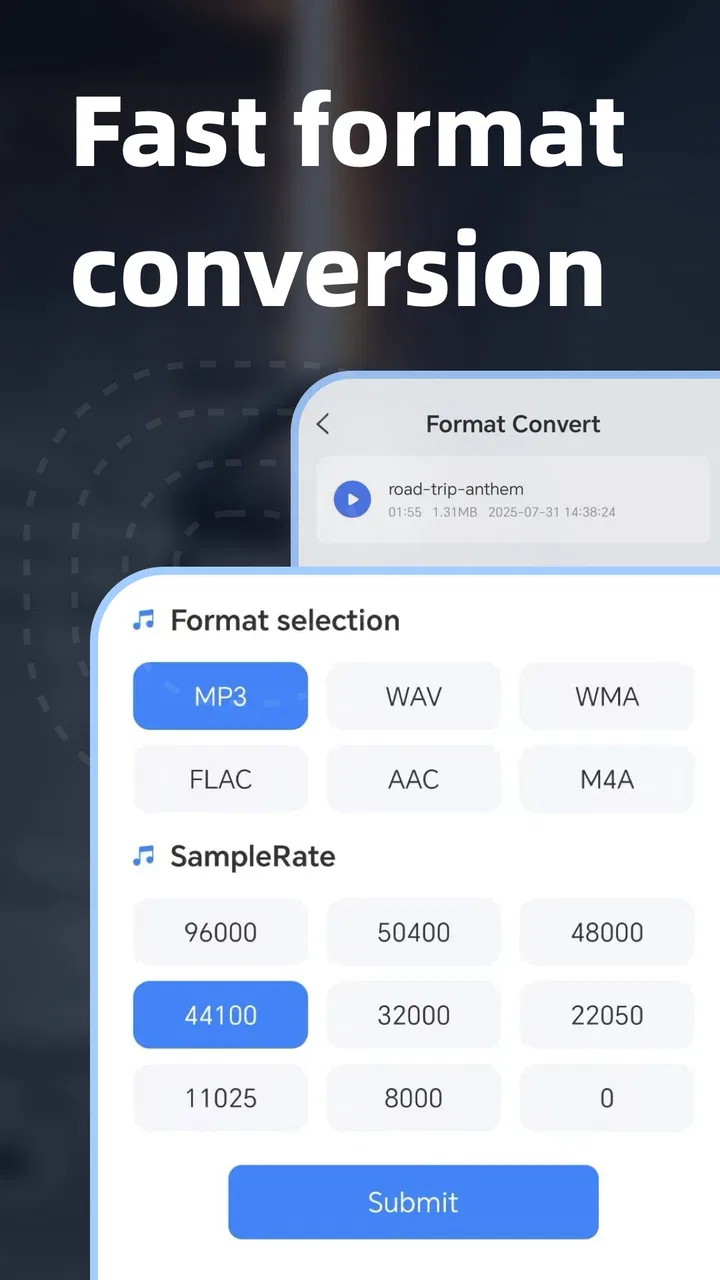
There is also a quality trade-off to keep in mind. Turning one file into another format does not restore detail that was already lost in the original. If the source is compressed, an additional conversion may preserve convenience without improving sound quality. I would therefore use extraction to change the form of a file for a specific reason, not because I expect the converted copy to sound better than the source.
What the release information tells existing users
The listed release date and current version give the app a clear point in its product life, but they do not justify dramatic claims about its future. I see the present build as a foundation that needs to prove itself through dependable everyday behavior. For someone installing it now, the relevant question is not whether it has a long history; it is whether the current workflow is comfortable enough for the jobs they actually have.
Existing users should notice the version number when troubleshooting or comparing behavior across devices. If an export behaves unexpectedly, I would first confirm that the phone is running the current build and that the operating system meets the requirement of Android 8.0 or later. That minimum makes the app accessible to many older Android phones, but compatibility on paper is not the same as identical performance on every device. Storage space, audio length, and the phone’s general speed can all affect how pleasant an edit feels.
The age rating is Everyone, which fits the app’s general purpose as an audio utility. That does not mean every imported recording will be suitable for every audience, of course; the rating describes the application rather than the content a user chooses to edit. I appreciate the distinction because it keeps the tool’s role clear: it is a general-purpose editor, not a content library.
The app is free to download, but in-app purchases range from $19.99 to $49.99 per item. That is the point I would investigate before committing to regular use. A free entry point is helpful for testing the workflow, yet the possible purchase range is significant enough that I would not assume every useful capability is included without checking the upgrade screen carefully. I would also avoid starting a large personal project until I understood which actions remain available without payment and what an upgrade actually unlocks.
This pricing structure changes my recommendation slightly. For a one-off trim or extraction, the free installation may be all a casual user needs. For repeated work, I would compare the cost of the relevant purchase with other editors available on the same platform. The right decision depends less on the headline price than on how often I edit audio and whether the app’s particular workflow saves me enough time.
Where it fits beside familiar alternatives
Compared with a full desktop editor, Audio Editor & MP3 Editor is easier to reach when I am already holding my phone, but it offers less room for precise inspection and complex arrangements. A desktop program is preferable when I need several tracks, detailed automation, careful noise work, or a long-form production. The phone app wins when the task is short, self-contained, and urgent.
Compared with a basic file manager, it is more purposeful because the job is organized around listening and changing audio rather than merely locating files. Compared with a dedicated recording app, however, I would not automatically expect the same emphasis on capture, monitoring, or live performance. If my main need were recording a rehearsal with dependable controls, I would look for a tool designed around recording first.
It also occupies a useful middle ground between a video editor and a music-production application. A video editor may handle soundtrack placement better, while a production app may offer deeper control over instruments and effects. This app makes more sense when audio itself is the object I need to prepare, especially when I do not want to build a full video project just to obtain an edited sound file.
Small decisions that improve the results
One non-obvious lesson with mobile audio editing is that the first cut should rarely be the final cut. I would make a rough selection, preview it, then slightly widen both ends before listening again. This helps avoid removing soft attacks or natural pauses. After that, I would tighten the boundaries only if the clip still feels too loose. The process takes a little longer, but it is more reliable than trusting a single visual drag.
A second useful habit is to separate editing from format decisions. First I decide what content should remain; only then do I think about the most suitable output for the next app or device. Mixing those decisions too early can lead to unnecessary re-exports and confusion about which file is the master copy. Keeping one clearly named edited source gives me more flexibility if I later need another version.
A third trade-off concerns silence. Removing every pause can make speech shorter, but it can also make a person sound rushed and unnatural. I would use the editor to remove distracting gaps, not automatically all quiet moments. For music, the equivalent issue is cutting away too much lead-in or tail, which can make a loop feel clipped. The app can perform the edit, but judgment about rhythm and tone still belongs to the user.
For longer recordings, I would work in sections and save intermediate exports with descriptive names. That is not glamorous, but it protects against losing a good passage while experimenting with another. It also makes it easier to compare versions on the phone’s normal music player instead of relying only on the editor’s preview.
Who should use it and who should skip it
I think this app is a good match for students, casual creators, family users, and anyone who regularly receives audio files that need a quick cleanup. It is especially appealing if you dislike moving files to a computer for small changes. The Everyone rating and broad Android compatibility make it approachable, while the free installation lowers the barrier to testing the basic experience.
I would also consider it for people who make short clips from their own recordings. A teacher preparing a spoken example, a traveler organizing audio from personal videos, or a small creator preparing a brief voice segment could all benefit from having an editor available without a desktop setup. The value comes from removing friction between “I have this recording” and “I need a usable shorter version.”
I would skip it if my priority were professional mixing, detailed restoration, multitrack composition, or repeatable studio production. I would also hesitate if I needed a clearly documented, highly specialized workflow for a large archive of audio. In those situations, a tool built around batch organization or advanced sound control would likely save more time in the long run.
Users who are uncomfortable with paid upgrades should inspect the app’s purchase prompts before building habits around it. The free label is useful for trying the product, but the available purchase range means the long-term cost deserves attention. I would not judge the app solely by whether it is free to install; I would judge it by whether the included workflow covers my actual recurring tasks.
Questions I would answer before installing
If you are wondering whether it works on an older Android phone, the stated minimum is Android 8.0 or later. That gives the app a relatively broad compatibility window, but I would still keep expectations realistic on devices with limited storage or slower performance. Audio editing is not usually demanding for a short file, yet long recordings and repeated exports can be less comfortable on aging hardware.
If you are asking whether it replaces a desktop editor, my answer is no, not for serious production. It can be the more convenient choice for trimming, extraction, and everyday preparation, but the desktop remains stronger for layered projects and precision work. I see the app as complementary rather than a universal replacement.
If you want to know whether it is suitable for a child, the Everyone rating indicates that the application itself is broadly appropriate. I would still supervise younger users when they import personal recordings, share edited files, or encounter purchase screens. The content being edited and the actions taken outside the editor are separate considerations.
If you are deciding whether the paid options are worthwhile, I would begin with your frequency of use. Someone making one quick edit may have no reason to spend more. Someone who edits audio every week should compare the available purchase with alternative apps and consider whether this particular interface is faster for their routine. Convenience can be worth paying for, but only when it solves a repeated problem.
Finally, if you are unsure whether to keep the original file, I strongly recommend doing so until the exported version has been listened to from beginning to end. Mobile editing encourages quick taps, and a saved source gives me a safe fallback when a boundary, format choice, or filename turns out to be wrong.
My recommendation after testing the idea behind it
Audio Editor & MP3 Editor makes the most sense as a practical phone-based audio utility: approachable, focused on everyday editing, and useful when moving to a computer would be excessive. CamSoft AI Magic has placed it in a part of the Music & Audio market where convenience matters more than studio depth, and its broad install base shows that the concept has reached many Android users.
My recommendation is positive but conditional. Install it if you need quick edits to recordings or video-derived audio and want to work directly on an Android device. Before relying on it for regular projects, test the exact file types and editing steps you use most, listen carefully to exported results, and review the in-app purchase choices. That small amount of caution will tell you more than the store summary alone.
The product is still at an early point in its release history, so I would watch how future versions address precision, export confidence, workflow clarity, and the balance between free access and paid features. Those are the areas that will determine whether it remains merely handy or becomes a dependable part of a creator’s routine. Right now, I would keep it installed for quick jobs, while reaching for a more advanced alternative whenever the project demands control rather than convenience.
FAQs for Audio Editor & MP3 Editor
01What can I do with Audio Editor & MP3 Editor?
Audio Editor & MP3 Editor is designed for common audio-editing tasks on a mobile device. You can typically trim unwanted sections, cut or merge clips, split longer recordings, adjust volume, and convert or export files in supported formats. It can also be useful for preparing ringtones, notification sounds, voice clips, podcasts, or short music edits without requiring advanced desktop software. Available tools and export options may vary by device and app version.
02Which audio formats does Audio Editor & MP3 Editor support?
The app is mainly intended for popular formats such as MP3, but support can also include files like WAV, AAC, M4A, or other formats depending on the version installed and your operating system. Before starting a project, check whether the original file appears in the import list. Export quality, bitrate, and format choices may differ, so users working with professional recordings should confirm the settings before saving the final file.
03Can I use Audio Editor & MP3 Editor to make a ringtone or notification sound?
Yes, one of the most practical uses is creating a short ringtone, alarm, or notification tone from an existing audio file. You can select the exact section you want, remove unnecessary silence, adjust the volume, and save the result as a separate file. After exporting, you may need to choose it manually in your phone’s sound settings, and some devices may restrict access to certain system folders.
04Does Audio Editor & MP3 Editor work offline, and what permissions does it require?
Basic editing can generally be performed offline once the application is installed, which is convenient when working with locally stored recordings or music. The app normally needs permission to access audio files and, depending on its features, storage or media libraries. Review the permission request carefully and allow only what is necessary. Features involving advertisements, cloud services, sharing, or online content may still require an internet connection.
05Will editing reduce the quality of my audio or overwrite the original file?
Audio quality depends on the export format, bitrate, and whether the file is re-encoded during saving. Exporting an MP3 at a lower bitrate can reduce clarity, while uncompressed formats usually preserve more detail but create larger files. It is safer to save the edited version under a new name rather than replacing the source. Keeping the original file also lets you repeat the edit if the result is not satisfactory.
Pros
- Supports multiple audio formats for flexible editing and exporting.
- Includes trimming
- cutting
- merging
- and volume adjustment tools.
- Simple interface makes basic edits easy for beginners.
- Useful for creating ringtones
- clips
- and short audio files.
- Quick processing is convenient for small editing projects.
Cons
- Advanced mixing and mastering features may be limited.
- Some tools or export options may require in-app purchases.
- Large audio files can take longer to load and process.
- The app may include advertisements in the free version.
- Precision editing can be difficult on smaller phone screens.

Audio Editor & MP3 Editor
Gallery